

 Phoenix 24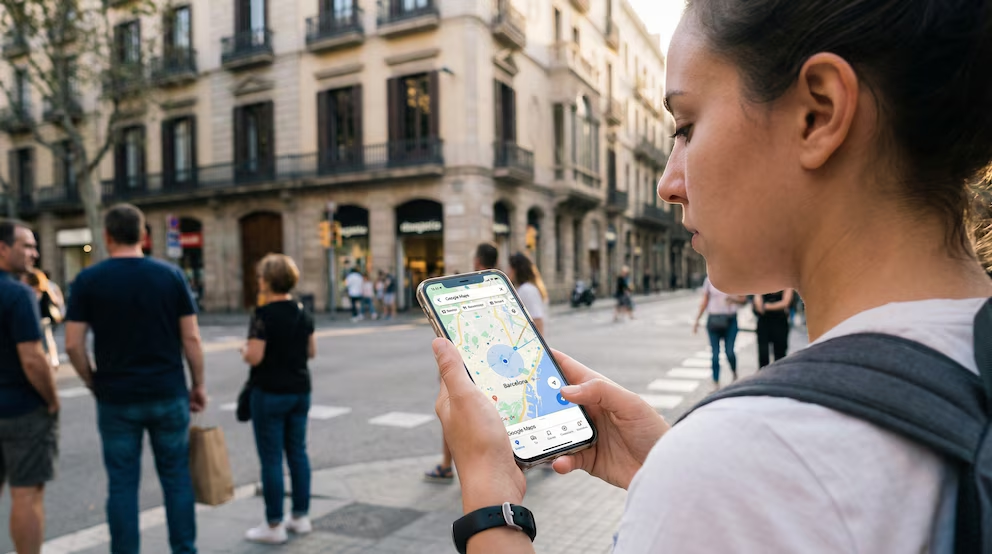
Accuracy is a probability, not a promise.
Mountain View, February 2026.
Most people treat the blue dot in Google Maps as a fact, a small circular certainty that says “you are here.” In reality it is a live estimate produced by a stack of sensors, radios, and assumptions, and the app is honest about that if you know what to look for. The dot marks the best current guess of your position, while the light blue circle around it represents uncertainty. If the circle is small, Maps is confident; if it grows, the system is effectively saying your phone could be anywhere inside that radius. Google’s own guidance describes the circle as the area where you might be located, a reminder that location is computed, not discovered.
The other visual cue is direction, and it is easy to misread. When you see a blue beam or wedge projecting from the dot, it is not a route suggestion, it is an orientation estimate based on your device’s compass and motion sensors. A narrow beam implies high confidence about which way the phone is facing, while a wide beam implies the compass needs help or the environment is distorting magnetometer readings. Google has explained that when the beam is wide or points the wrong way, compass calibration is the first fix. Samsung, speaking to its own device base, reinforces the same principle: a simple figure eight motion can tighten the heading indicator and reduce confusion at intersections. This is not cosmetic, because navigation depends as much on knowing which way you are turned as on knowing where you are standing.

Under the hood, your location is usually a fusion of multiple signals, and the mix changes minute by minute. GPS and other global navigation satellite systems provide strong outdoor positioning, but tall buildings, dense trees, tunnels, and reflective surfaces can create multipath errors that make the phone think it is one street over. Wi Fi and Bluetooth signals can improve positioning in cities and indoors by matching visible networks and beacons against known fingerprints, while cell tower signals offer broader, lower precision triangulation. Your phone’s accelerometer and gyroscope help smooth movement between fixes, which is why the dot can keep sliding even when raw satellite lock is unstable. The result is a continuously updated best estimate rather than a single measurement, and that is exactly what the blue dot represents.
This is also why the dot sometimes turns gray or appears to lag. If Maps cannot determine a current location, it may fall back to the last known position until new data arrives, which users often interpret as the app being wrong when it is actually waiting. Battery saving modes can degrade the quality of the underlying signal mix by limiting background scanning and reducing sensor sampling. If you are on a train, in a car, or surrounded by high rise structures, a few seconds of drift can look like a major error even though it is a predictable byproduct of signal obstruction and timing. Apple’s own explanation of location markers in iOS uses similar language: when precise location is not available, the system shows a circle that communicates how certain the estimate is. Different ecosystems, same message, the marker is always probabilistic.
If you want to know where you are in real time, the most practical move is to interpret the dot like an instrument panel. A tight circle and a narrow beam are strong indicators that both position and orientation are stable. A large circle suggests you should wait for a clearer fix, move to an open area, or allow the phone to re sample Wi Fi signals. A wide beam suggests compass error rather than position error, which matters when you are standing still and trying to choose the correct street direction. Tapping the dot in Google Maps typically surfaces quick actions, including calibration prompts or guidance on improving accuracy, which is the app’s way of turning uncertainty into a fixable workflow.
There is also a permissions layer that has become more explicit in recent mobile operating systems. Modern Android and iOS versions allow users to grant either approximate or precise location, and to limit access to only while using the app rather than always. If your permissions are set to approximate, the blue dot may remain inside a stubbornly large circle even in good conditions, because the operating system is intentionally degrading precision. Google’s guidance on iPhone and iPad emphasizes that location services must be enabled and that permission level affects how accurately Maps can place the dot. This is not a bug, it is governance by design, and it shifts power toward the user at the cost of occasional frustration.
The privacy dimension is the silent twin of the accuracy story. Location is one of the most sensitive data categories because it reveals patterns of life rather than isolated facts. European regulators, including the European Data Protection Board, have repeatedly treated location as personal data with heightened risk when combined with identifiers and behavioral profiles. The practical implication is that “real time location” is never purely technical; it is also a consent relationship between you, the operating system, and the app. If you are sharing location with others, using location history features, or allowing always on access, the blue dot becomes part of a broader data trail that lives beyond the moment of navigation. Accuracy improves with more signals and more access, but so does the sensitivity of what is being collected.

The pattern worth noticing is that the blue dot has become a language of trust. People accept major decisions based on it, from meeting points and ride pickups to safety checks and emergency coordination. Yet the interface quietly insists on nuance, using a circle to admit uncertainty and a beam to admit directional error. That is a rare kind of transparency in consumer technology, because it shows the margin of error instead of hiding it behind a single authoritative point. Understanding those cues makes you less dependent on the illusion of precision and more capable of using Maps like a system, not like an oracle. In a world where navigation is treated as an entitlement, the blue dot is a reminder that certainty is always negotiated between physics, software, and policy.
La verdad es estructura, no ruido. / Truth is structure, not noise.