

 Phoenix 24
Working devices remain usable, but failed systems face uncertainty.
Cupertino | July 2026
Apple temporarily stopped authorizing several recently released software versions for older iPhone and iPad models, leaving some devices without an officially signed operating system that could be installed through a computer-based restoration. The measure did not remotely disable functioning devices, but it created a serious obstacle for users whose equipment needed to be erased, recovered or reinstalled.
The affected software branches included iOS and iPadOS 12.5.8, 15.8.6, 16.7.13 and, according to technical monitoring reports, certain installations associated with version 18.7.4. These editions had been distributed specifically to hardware incapable of running Apple’s newest operating systems.
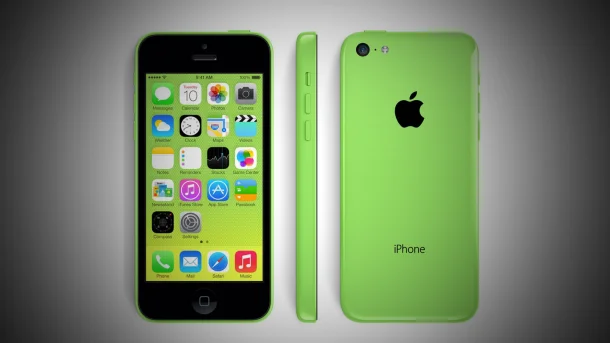
Among the potentially affected devices were the iPhone 5s, iPhone 6 and iPhone 6 Plus, together with the original iPad Air, iPad mini 2 and iPad mini 3. Those products depend on the iOS 12 branch because their processors cannot support later generations of the operating system.
The interruption also reached equipment compatible with iOS 15, including the iPhone 6s and 6s Plus, the first-generation iPhone SE, the iPhone 7 and 7 Plus, the iPad Air 2 and the fourth-generation iPad mini.
The iOS 16 group included the iPhone 8, iPhone 8 Plus and iPhone X, as well as selected older iPad and iPad Pro models. These products remain capable of performing many ordinary functions, but their operating-system options are increasingly limited as Apple concentrates development on newer hardware.
Apple controls which software can be installed through a digital authorization process commonly known as firmware signing. When a user restores an iPhone or iPad through Finder, Apple Devices or iTunes, the computer contacts Apple’s servers to confirm that the requested operating-system image remains approved.
Without that authorization, the installation cannot normally continue. Downloading the software file independently does not solve the problem because the device verifies Apple’s cryptographic approval before accepting it.
This policy allows Apple to prevent users from returning permanently to outdated versions containing known security vulnerabilities. It also ensures that most active devices remain on the latest compatible software. The same centralized control, however, means Apple can instantly remove the only official restoration path available to obsolete hardware.
For most users, the interruption produced no immediate visible change. An iPhone already operating normally could continue making calls, opening installed applications and accessing local information. The signing withdrawal did not automatically erase files, block the screen or deactivate the hardware.
The risk appeared when a device entered recovery mode, suffered serious software corruption or required a complete factory restoration. Without a signed operating system, the computer could download the software but would be unable to complete Apple’s verification process.
A user attempting to prepare an older device for resale could encounter the same difficulty after erasing it. Technicians repairing storage, battery or system failures could also become unable to reinstall the official software needed to return the product to service.
The situation was reportedly connected to connectivity failures affecting some older Apple devices on Australia’s Telstra network. Customers using the iPhone 8, iPhone 8 Plus and iPhone X experienced problems making and receiving calls after installing iOS 16.7.13.

The issue carried particular urgency because some affected users also reported difficulty reaching Australia’s emergency telephone service. Telstra and Apple investigated the failure while customers were advised to avoid installing the problematic update until corrective measures became available.
Apple issued a carrier-settings adjustment and worked on broader software corrections. During the investigation, signing for several legacy updates was paused, apparently to prevent additional installations while engineers evaluated whether the problem extended beyond one software branch.
The withdrawal generated confusion because the affected versions had served an unusual purpose. Apple had released updates such as iOS 12.5.8 and iOS 15.8.6 to renew certificates required by essential services, including device activation, iMessage and FaceTime.
Those certificates were approaching expiration and could have caused critical functions to stop operating after January 2027. The updates therefore extended the useful life of hardware introduced more than a decade earlier, even though those devices no longer received contemporary features.
The same software intended to preserve old products was then temporarily removed from Apple’s authorization system. That contradiction exposed the fragility of long-term device support when continued operation depends on remotely controlled certificates, activation servers and signed installation files.
Subsequent technical records indicated that the interruption was temporary and that the affected updates were eventually reauthorized. The episode nevertheless demonstrated what can happen when no signed restoration image remains available for a device.
Users should distinguish between losing access to new updates and losing the ability to restore existing software. An unsupported iPhone can continue functioning for years after its final major update. A device without an authorized restoration image faces a different problem because a single serious failure may prevent it from returning to operation.
Owners of older Apple products should maintain current backups while the devices remain functional. Photos, contacts, documents and messages should be synchronized or copied before attempting repairs, resets or experimental software changes.
A local encrypted backup stored on a Mac or PC can preserve more information than relying exclusively on synchronization services. It does not eliminate the need for signed firmware, but it reduces the risk of permanent data loss if the device must later be replaced.
Users should also avoid unnecessary factory resets when restoration availability is uncertain. Erasing a working device before confirming that Apple still authorizes its operating system can turn a functional phone or tablet into hardware that cannot complete activation.
Third-party tools may claim to install unsigned software, but these methods frequently require saved authorization data, security exploits or advanced technical procedures. They can introduce additional risks and should not be presented as ordinary solutions for general consumers.
The episode raises broader questions about technological ownership. A person may physically possess an iPhone, but the ability to reinstall its operating system remains dependent on Apple’s remote authorization infrastructure. The hardware belongs to the customer, while part of its continued usability remains controlled by the manufacturer.
Apple can justify signing restrictions through cybersecurity. Allowing unrestricted installation of vulnerable software could expose users, corporate networks and digital services to preventable attacks. Centralized authorization also reduces fragmentation across the company’s ecosystem.
The same mechanism can shorten the practical lifespan of otherwise functional equipment. When repair, activation and restoration depend on servers maintained at the manufacturer’s discretion, product longevity is determined by more than batteries, processors and replacement components.
This tension has environmental implications. Extending the life of an older phone reduces electronic waste and delays the consumption of materials required to manufacture a replacement. Removing restoration options can push users toward new purchases even when the existing hardware remains physically serviceable.
Apple’s temporary withdrawal did not permanently condemn every affected iPhone or iPad. It revealed, however, how quickly software authorization can become the decisive boundary between a repairable device and an unusable one.
The lesson for owners is practical: keep older equipment updated to its latest compatible version, maintain independent backups and verify restoration availability before erasing or repairing the system. A functioning device may appear fully under the user’s control, but its second life can still depend on a distant server approving the installation.
La obsolescencia comienza cuando reparar deja de ser una opción. / Obsolescence begins when repair is no longer an option.