

 Phoenix 24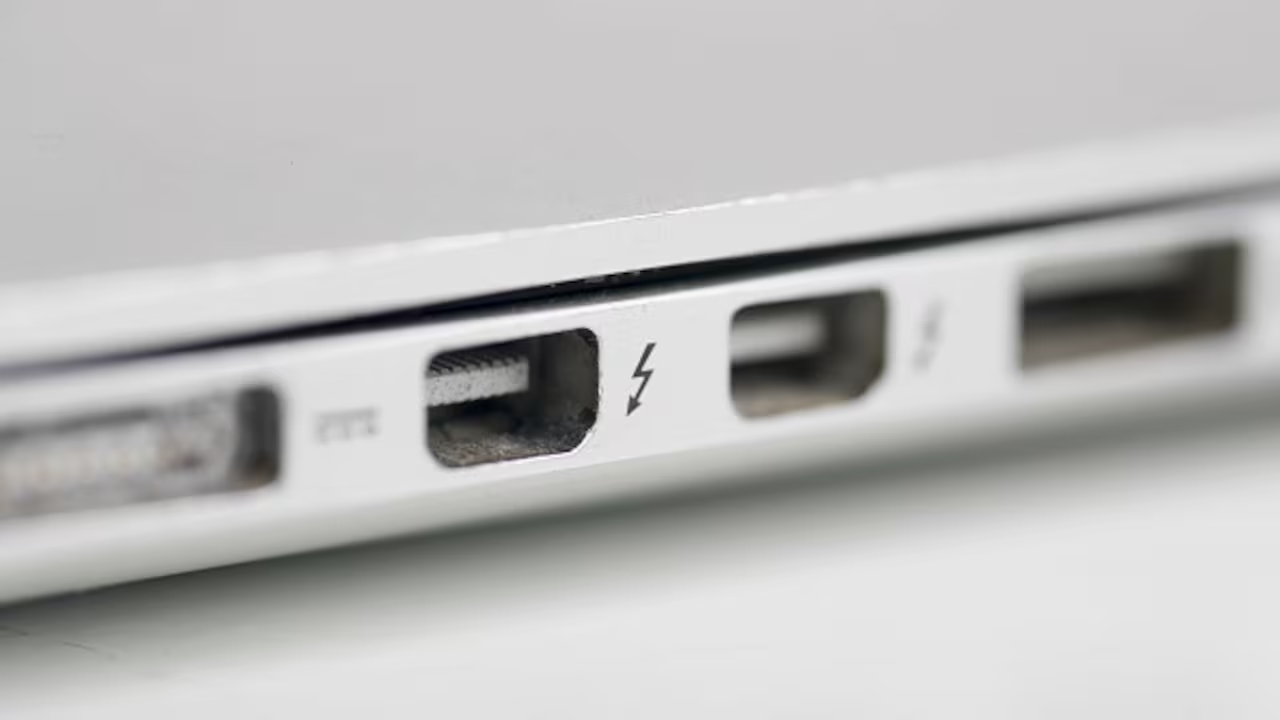
A small icon can reveal a useful charging function.
Bogotá, June 2026
Millions of people see a lightning-bolt symbol beside a USB port every day without realizing that it often identifies a connection designed to provide power even when a computer is asleep or completely turned off. Commonly known as an always-on, sleep-and-charge or power-sharing port, it allows users to recharge phones, headphones, smartwatches and other compatible devices without keeping the computer fully operating. The feature can be especially useful while travelling or when electrical outlets are limited. Its exact capabilities, however, depend on the manufacturer, computer model and system settings.
A conventional USB port normally transfers data and supplies electrical power while the computer is running. When the device shuts down, many standard ports also stop delivering electricity. A port marked with a lightning bolt may remain energized by drawing power from the laptop’s battery or external charger. This turns the computer into a temporary charging station for smaller electronic devices.
Manufacturers use different commercial names for the same general function. Dell commonly refers to it as PowerShare, while some Toshiba computers use the term Sleep-and-Charge. Other brands describe it as always-on USB, powered USB or charging USB. The symbols also vary, sometimes combining the traditional USB emblem with a lightning bolt, battery or charging icon.
The feature does not necessarily mean that the port offers the fastest possible charging speed. It primarily indicates that the connection has enhanced power-delivery capabilities or can remain active under conditions in which ordinary USB ports are disabled. Actual charging performance depends on the electrical output supported by the computer and the requirements of the connected device. A modern smartphone may charge more slowly from an older USB-A port than from its dedicated wall adapter.
Some computers allow users to control the function through the operating system, manufacturer software or firmware settings. An always-on USB option may need to be activated in the BIOS or UEFI configuration before the port supplies power while the laptop is shut down. Other models enable it automatically when the computer is connected to an electrical outlet. The owner’s manual usually explains whether the function can be adjusted and under which power states it remains available.
Battery consumption is the principal disadvantage. When a laptop is disconnected from the wall, charging another device transfers energy from the computer’s internal battery. A phone, wireless headset or portable speaker can therefore reduce the remaining operating time of the laptop. Manufacturers often include a protection threshold that disables the feature when the computer battery falls below a predetermined level.
The marked port can be particularly practical at airports, hotels, classrooms and workplaces. A user may connect a phone overnight without leaving the laptop screen, processor and cooling system active. During travel, the computer can function similarly to a large power bank. The convenience is greatest when the laptop has a high-capacity battery and the accessory being charged requires relatively little energy.
Users should distinguish this symbol from the lightning icon associated with Thunderbolt. Thunderbolt is a high-performance connection standard capable of carrying data, video and electrical power through a single cable. Modern versions use the same physical USB-C connector found on many ordinary USB devices. A lightning-bolt emblem next to a USB-C port often identifies Thunderbolt rather than merely an always-on charging function.
Thunderbolt ports support features beyond standard charging. Depending on the version and equipment, they can connect high-resolution monitors, external storage systems, docking stations, network adapters and other professional peripherals. They can also transmit data at considerably higher speeds than many conventional USB connections. The symbol’s meaning must therefore be interpreted according to the type of connector and the surrounding markings.
On a traditional rectangular USB-A port, the lightning symbol frequently indicates sleep-and-charge capability. On a small reversible USB-C connection, the same general symbol may identify Thunderbolt technology. Some manufacturers also place battery or plug icons beside charging-capable USB-C ports. Because labeling is not completely uniform across the industry, the computer’s technical specifications remain the most reliable reference.
USB-C itself describes the physical shape of the connector rather than a guaranteed level of performance. Two ports that appear identical can support very different combinations of charging power, data speed and video output. One may provide only basic USB communication, while another supports USB4, DisplayPort and Thunderbolt. Visual similarity does not mean technical equivalence.
Cables also influence performance. A low-quality or basic charging cable may not support the maximum data speed or power available from the port. Thunderbolt functions generally require a compatible cable, especially over longer distances or at the highest transfer rates. Connecting an ordinary USB device will often work, but advanced capabilities may remain unavailable.
Users should also avoid assuming that every marked port can recharge a laptop itself. A USB port capable of charging external devices is not necessarily designed to accept power from a charger. USB-C Power Delivery ports can often receive electricity and charge the computer, but this function must be confirmed in the specifications. Traditional USB-A ports almost always provide power outward rather than receiving it.
The safest approach is to examine the exact symbol and connector type before attaching expensive accessories. The manufacturer’s support application, manual or product page can clarify whether the port supports always-on charging, Thunderbolt, video output or laptop charging. Understanding these distinctions prevents users from purchasing incompatible docks, chargers and cables. It also allows them to use capabilities that may have remained unnoticed for years.
The lightning bolt is therefore more than a decorative marking. Beside a rectangular USB port, it commonly reveals an energy-sharing function that continues working while the computer rests. Beside USB-C, it may indicate a considerably more advanced Thunderbolt interface. In both cases, the small symbol communicates that the port can do more than an ordinary connection, provided the user understands exactly which technology it represents.
La tecnología también habla mediante símbolos. / Technology also speaks through symbols.