

 Phoenix 24
Storage fills quietly, then the phone slows.
Menlo Park, February 2026.
Most people discover “WhatsApp junk files” the moment their phone begins to hesitate: photos take longer to open, the camera refuses to save, and a simple update demands space that somehow vanished. The phrase sounds like a hidden folder full of meaningless debris, but the reality is more ordinary and more expensive. What accumulates is media and data that once felt harmless in the moment: forwarded videos, duplicated images, long voice notes, document attachments, and cached fragments that help the app load faster. Over weeks and months, convenience becomes bulk, and bulk becomes a storage crisis.

Calling it a “trash bin” is partly a myth and partly a user-interface shortcut. WhatsApp does not operate like a desktop recycle bin with a clear, universal place where everything deleted waits for a second chance. What users often label as the “bin” is the app’s storage management layer, a dashboard that surfaces the heaviest items and the most storage-hungry chats so you can delete them deliberately. In other words, it is not a place where files go to die, it is a place where you decide what you no longer want to keep. That distinction matters because it changes expectations: there is no magic empty button that safely clears everything without consequences.
The first reason storage explodes is duplication that feels invisible. A single meme video can exist in a chat thread, in your gallery, in a “sent” folder, and in the cache that helps previews load instantly. If you share the same clip across multiple groups, you multiply the footprint without noticing because the conversation remains one screen and the storage is distributed across folders. The second reason is that WhatsApp tends to hold on to “small” things that add up, like thumbnails, stickers, and short audio notes that seem negligible until they number in the thousands. The third reason is behavioral: auto-download turns your phone into a passive archive for other people’s habits.
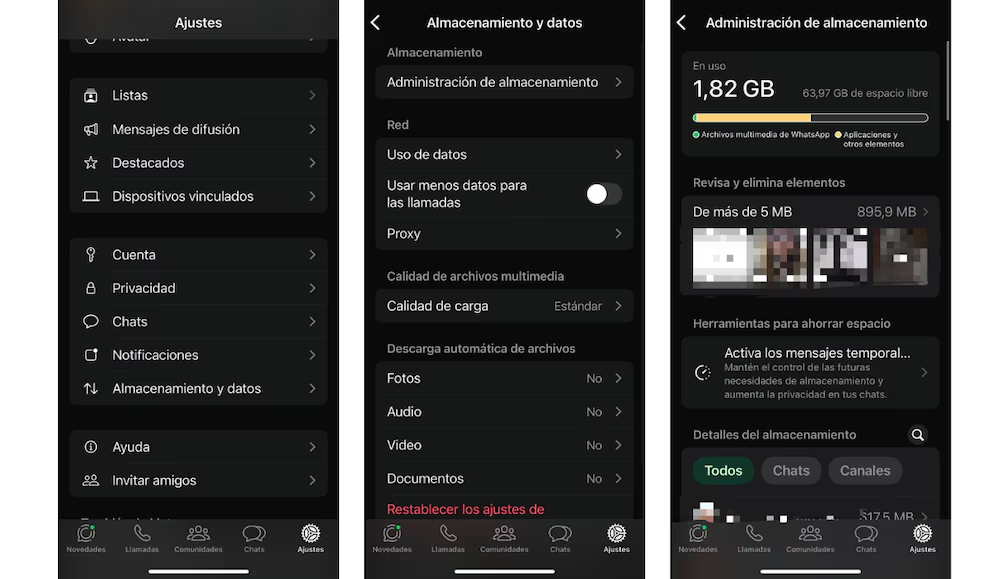
This is where the cleanup logic becomes simple but non-intuitive. The goal is not to delete “junk,” but to remove high-weight items you no longer need while preserving what still has value, legally, emotionally, or professionally. WhatsApp’s built-in storage tools are designed for that triage, because they let you sort by size and review content before you erase it. Open WhatsApp, go to Settings, then Storage and data, then Manage storage, and you will see categories that highlight large items and chats consuming disproportionate space. From there, you can select multiple files and delete them using the trash icon, which is the closest thing the app offers to a “bin” action.
The most effective cleanup is usually surgical, not aggressive. Start with large videos, especially those forwarded many times, because they occupy space and rarely retain long-term value. Then review high-traffic groups where images and clips arrive constantly, because those chats can quietly become the largest storage container on the device. Finally, delete old documents that were useful at the moment, tickets, PDFs, repeated screenshots, and files that already live somewhere more appropriate. Doing this inside WhatsApp is safer than deleting blindly from the phone’s file manager because it reduces the chance of breaking chat previews or losing context you still want.
Android and iPhone diverge in what “extra” cleaning is possible, and that is where confusion grows. On Android, you can often clear the app cache from the system’s application settings, which removes temporary files without erasing chats, and that can recover space when previews and temporary media have piled up. On iPhone, cache clearing is more limited at the system level, so the equivalent strategy is to rely more heavily on WhatsApp’s Manage storage tool and, in some cases, consider reinstalling the app after ensuring backups are current. Reinstalling is not a trick, it is a reset of temporary storage, but it is only safe if you have verified your chat backup and understand what will and will not return. The mistake people make is treating deletion as reversible when their backup is outdated or disabled.
Backups are the hidden second layer of “junk,” because they can preserve the very bulk you just removed. If your WhatsApp backup includes media, deleting videos in-app may reduce local storage while the cloud backup continues to hold older versions, depending on how your backup cycles work. On iPhone, review iCloud backup settings for WhatsApp and understand whether media is included, because that affects both storage and restoration behavior. On Android, check Google Drive backups and confirm what is being stored, because large backups can become their own problem and can also rehydrate old media after a device migration. The cleanest approach is to clean first, then back up, so the new backup reflects the lighter state rather than preserving the old weight.
Prevention is where most users win back control. Turn off auto-download for videos in groups unless you truly want everything saved, because group media is the fastest way to fill a phone. Consider limiting “media visibility” behavior so that every received item does not automatically appear in your main gallery, which reduces the sense that your camera roll is being invaded by other people’s content. Use disappearing messages in low-stakes chats where you do not need a permanent archive, because that changes storage growth over time. And treat WhatsApp as a messaging layer, not your only document vault, because messaging apps are optimized for flow, not for long-term file governance.
The final rule is the one that prevents regret: delete with intent, not with panic. Before you purge, decide what must remain accessible in chats and what can live elsewhere, then act accordingly. A phone that runs out of storage is not merely annoying, it is operationally fragile, because it can fail at the worst moment when you need a photo, a document, or an update. WhatsApp’s “junk files” are simply the evidence of how modern communication behaves: constant, multimedia, and quietly expensive. Once you see that pattern, cleanup stops being a one-time rescue and becomes a habit of control.
Más allá de la noticia, el patrón. / Beyond the news, the pattern.