

 Phoenix 24
Storage pressure changes how you use your phone.
Cupertino, January 2026.
Running out of space on an iPhone is more than a technical annoyance. It affects performance, blocks system updates and changes daily habits, from taking photos to installing new apps. Many users only react when storage is almost full, but the problem usually grows slowly and silently. Photos, videos, apps and system data accumulate without being noticed. Managing storage is therefore not an emergency task but an ongoing practice.
The first essential step is reviewing large personal files. Photos and videos are usually the biggest storage consumers. Over time, duplicates, screenshots, short clips and forgotten media build up without clear purpose. Manually reviewing the gallery and deleting what no longer matters can free a surprising amount of space. Cloud optimization tools can also keep full quality files online while storing lighter versions on the device, reducing local usage without deleting memories.

A second method is controlling installed applications. Many apps remain on phones long after they stop being useful. Some are opened once and forgotten, yet they keep large amounts of data. iPhone systems allow offloading apps, which removes the app itself but keeps its documents and settings. This lets users reinstall later without losing information. Regularly checking which apps are rarely used helps prevent silent storage leaks.
Offline content is another major factor. Music, podcasts, movies and series downloaded for travel or convenience often stay long after being used. Each file may seem small, but together they occupy gigabytes. Reviewing offline downloads inside streaming and audio apps helps recover space quickly. Limiting automatic downloads also prevents new files from piling up without notice. Convenience should not become permanent storage debt.
Moving files to external or cloud storage is a longer term solution. iPhones have fixed internal limits, but cloud systems expand almost endlessly. Uploading photos, videos and documents and then deleting local copies can dramatically increase free space. Some systems automatically keep lighter versions locally while storing originals online. Others allow full removal from the phone after upload. This method works best when paired with reliable internet access.
Clearing cached and temporary data is another practical tactic. Browsers, social apps and video platforms store files to load faster next time. Over weeks or months, these caches grow larger than necessary. Checking storage by app inside system settings shows how much space each one uses. In some cases, deleting and reinstalling an app is the fastest way to reset its data footprint. This costs time but often recovers large amounts of space.

Messages also deserve attention. Conversations with photos and videos silently store heavy files even if the text itself looks small. Many people never delete old threads, especially family or group chats. Setting automatic deletion after a fixed time, such as one year or one month, prevents endless accumulation. Manually removing large attachments from conversations also helps. Messages should be communication tools, not long term archives.
System files and updates are often overlooked. Old backups, incomplete updates and temporary system files sometimes remain on the device. Reviewing system storage can reveal backups that are no longer needed. Deleting outdated backups or moving them to cloud storage can free space safely. After updates, checking whether leftover installation files remain is also useful. System health depends on cleanliness as much as apps do.
These methods work best when combined. Deleting files once helps, but habits prevent future problems. Setting a routine to review storage every few weeks keeps the phone healthy. Users who frequently take photos or install new apps should check more often. Storage management is similar to cleaning a workspace. When ignored, it becomes overwhelming, but when maintained, it is simple.
Beyond space itself, performance is at stake. Devices with low free storage often slow down, crash more easily and struggle with updates. Many problems blamed on hardware are actually storage related. Keeping enough free space allows the system to operate smoothly and handle background processes. A clean storage environment supports both speed and stability.
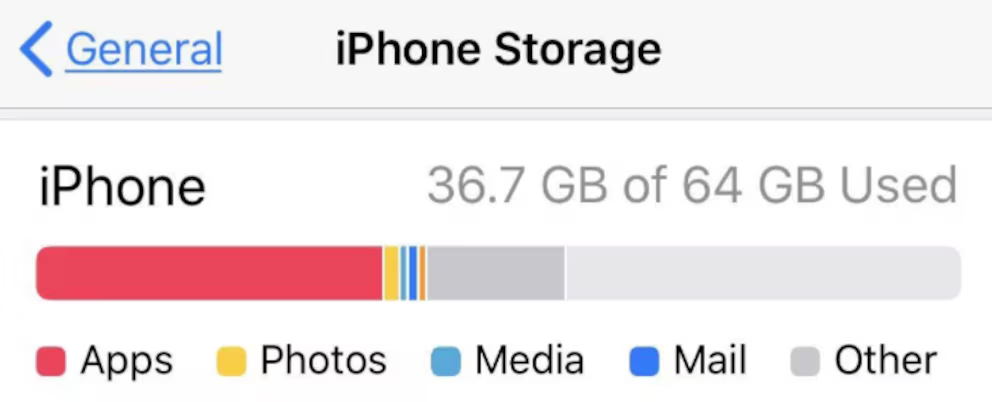
Understanding storage usage is the foundation of control. The iPhone settings menu shows how space is divided among apps, media and system files. This overview reveals where problems really are. Some users discover that one app alone uses more space than all photos combined. Others learn that videos dominate their storage. Knowledge guides action.
Freeing space is not about deleting everything. It is about deciding what deserves to stay close and what can live elsewhere. Phones are tools for the present, not warehouses for the past. By choosing what remains on the device, users shape how the phone serves them. Storage is not just technical capacity, it is a reflection of priorities.
When storage is managed well, the phone feels lighter in every sense. Updates install smoothly, photos save without warning messages, and new apps fit without anxiety. These small comforts define daily digital life. They are not luxuries, but results of simple, consistent habits. Space, in the end, is not only memory. It is freedom of use.
Beyond the news, the pattern.
Más allá de la noticia, el patrón.